Is Media Fair? 2025

Room 19 session with Whaea Natalie,

focused on is media fair? Our class here really enjoyed this session. We understand that the media is very biased, and by researching the products and the truth behind them. Creating Alternative versions of these ads showing the truth of the product.
Enjoy exploring our class blogs to see what we have come up with.


Is Media Fair?

Malo e Lelei,

Today, I learnt how to create an alternative version of a McDonald’s ad that shows the truth about the product.

Here are some examples of how they attract the audience and convince them to buy what they sell.

I really am disappointed that Big Mac’s doesn’t look as perfect as they do in the ads.

When you can’t enjoy what you buy, because it’s a lie! LOL


What is Media?

We have been learning about

Media is anything that helps us share information or tell stories, like TV, radio, books, newspapers, and the internet. It helps people learn, have fun, and stay informed about what’s happening around the world.

I created a definition of what I think Media

I made a copy and completed the drag-and-drop activity to show the different types of media I have encountered and created.

I found this interesting because I can see what I’ve created and what I have encountered.

Our Tongan Marine Life Adventures!

Malo e lelei,

This week, we dived into the beautiful world of Tongan marine life. Our mission was to become digital artists and create our own sea creatures using Google Draw.

First, we made a copy of our slides and saved them in our Cybersmart folders. Then, the real fun began! We used the shapes tool to build our sea creatures piece by piece. We picked all sorts of bright colors to bring them to life.

You all did an amazing job! We saw fantastic fish, cool turtles, giant whales, and even some swaying seaweed. Each one was unique and creative.

Next time, we’ll take our creations to the next level. We’ll learn how to group our shapes, and use some cool copy and paste tricks to get them moving.

Great job, Room 19!

We can’t wait to see your underwater worlds come to life with animation.

Week 5: Our Famous Mates!

What a busy and exciting week we had in Room 19!

We had a little interruption with a fire evacuation, which meant less time for our project, but everyone did an amazing job with what we had.

For our “Famous Mates” activity, we used our Chromebooks to get creative. First, we all made a copy of the slides and saved them to our cybersmart folder. This is a great habit to practice to keep our work organised!

The most fun part was using the website remove.bg. We all learned how to upload a photo of a famous person and a photo of ourselves to remove the backgrounds. This let us put ourselves and our “famous mates” in all sorts of cool places. We added a new background to our pictures, and they looked fantastic.

Even though we ran out of time to upload everything to the blog, everyone did great work. We’re proud of the cool creations you made!

Check out some of our classes famous mates below!

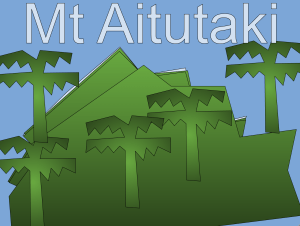
Creating Mt. Aitutaki in Google Drawings

What an incredible week for Room 19!

For Cook Islands Language Week, we dove into a fantastic cybersmart lesson exploring the legend of Mount Aitutaki. We learned a fascinating fact: it was once part of a much larger mountain!

To bring this story to life, we became digital artists using Google Drawings. Our mission was to create our own unique mountains using the polyline tool. This was a great challenge, and we quickly learned a crucial trick: you have to connect the lines to make a complete shape before you can fill it with color!

Some of us found it tricky to close those shapes and draw the trees, but we didn’t give up! It was a great lesson in perseverance. Seeing everyone focus and work through the challenge was truly inspiring.

And the best part? Some students were able to embed their creations directly into their blogs and publish them for the world to see. What a fantastic way to share our learning!

Check out some of our learners work below!

You all did an amazing job, Room 19. Keep up the great work!
Room 19’s “Two Truths and a Lie”!

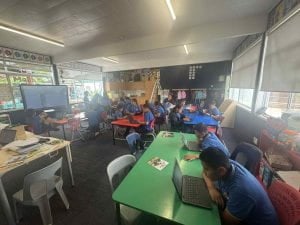
Guess what, everyone? Room 19 just had a super cool time playing “Two Truths and a Lie” on our Chromebooks! It wasn’t just a fun game; it helped us become even better at using our computers!

Here’s how we did it:

First, we learned a really important computer trick: how to make a copy of our special “Two Truths and a Lie” paper and put our initials on it. Then, we saved it safely in our Cybersmart folder. That way, we know exactly where to find our work later!

Next, it was time to get creative! We found awesome pictures from the internet that showed our two true things and our one sneaky lie. We saw everything from our favorite pets to our wildest dreams – it was so much fun finding just the right picture! After that, we typed in our two truths and one lie for our friends to guess.

The coolest part was sharing! Most of us were able to share our “Two Truths and a Lie” on our class blogs. That means everyone could see our amazing work! And guess what? A couple of super helpful friends even wrote nice comments on their classmates’ blogs. It’s great to see us being kind and supportive online!

We’re so proud of everyone in Room 19 for trying their best and becoming Chromebook champions! You all did a fantastic job!

Room 19’s “All About Me” Creations!

Kia Ora Room 19 whānau and friends,

This week in Room 19, our learners have been busy diving into a really special project: creating their very own “All About Me” bios for their blogs! It’s been wonderful to see their personalities shine through as they shared what makes them unique.

Our tamariki showed off some fantastic digital skills. They were able to make a copy of the “About Me” template, then thoughtfully edit their bios to include all sorts of interesting facts about themselves. From favourite hobbies to family members, it was great to read about what’s important to them.

Adding a personal touch, each learner then added a photo to their bio, making their pages truly their own. The real magic happened when they learned to embed their Google Drawings into their blog posts. This is a super cool skill that brings their creativity right onto their blog page for everyone to see!

We even had some fast finishers who got a head start on a new, exciting project: creating fridge magnets! These magnets will be a special way for whānau and friends to easily access and visit their blogs from home. How cool is that?

We’re so proud of the effort and digital literacy our Room 19 learners demonstrated this week. It’s awesome to see them express themselves and connect with their online learning space.

Stay tuned – we can’t wait for you to see their amazing “All About Me” bios on their blogs soon!